Beautiful.ai Presentation Alternatives: 5 Tools That Work Better in Real Teams
Beautiful.ai’s smart layouts feel magical — right up until you need a custom animation or a stakeholder insists on PowerPoint. Suddenly exports misalign charts, co-editing stalls, and the team is back to juggling “final_v3” files.
The pain is widespread: Canva’s 2024 Visual Economy Report says 82 percent of business leaders try AI-powered visual tools but hit editing or collaboration roadblocks.
This guide compares five stronger options, shows when each one excels, and reveals why Plus AI’s Slides add-on is often the quickest path to native, instantly shareable decks.
How to size up an AI slide tool before you switch
Speed alone never seals the deal; the tool must fit how your team already builds, edits, and shares decks. Veteran presentation teams typically judge new software against seven practical factors:
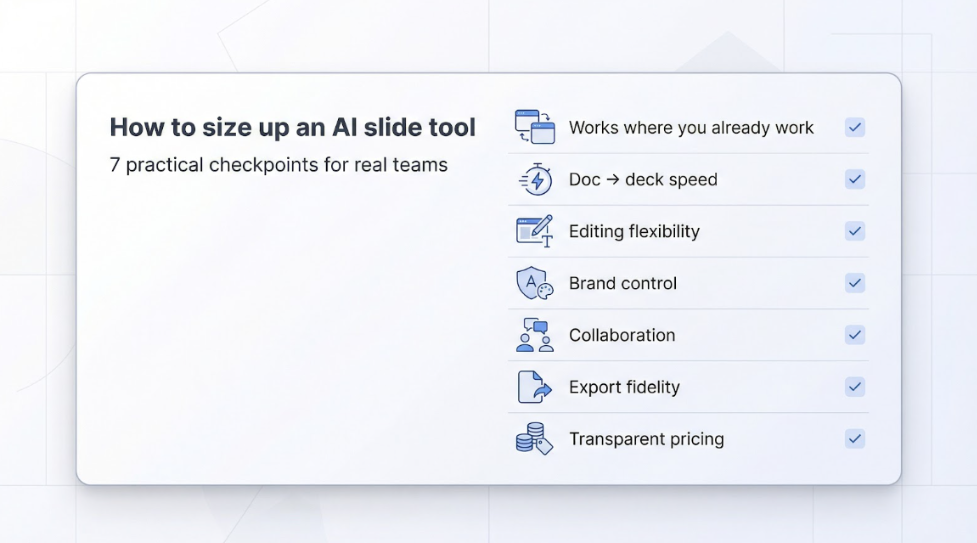
- Works where you already work. An add-in that lives inside Google Slides or PowerPoint spares everyone the export–import shuffle.
- Turns long docs into first drafts fast. One tool that already checks several of those boxes is Plus AI’s add-in for Google Slides and PowerPoint: the company sets an input ceiling of 100,000 characters—about 20,000 words—so whole briefing docs paste in at once, and a fully native deck typically appears in under a minute.
- Let’s keep tweaking. Genuine editing freedom means moving elements, changing layouts, even adding custom animations after the AI finishes.
- Keeps every slide on-brand. Locked fonts, colors, and logo positions prevent last-minute “design police” fixes.
- Handles real-time teamwork. Live cursors, inline comments, and version history protect teams from “final_FINAL_2.pptx” chaos.
- Exports cleanly when it must. A .pptx should open without missing fonts or misaligned charts, which saves precious meeting prep time.
- Shows transparent pricing. Check how per-seat costs grow when you add users or exceed monthly generation limits.
Keep these checkpoints handy as you read the tool reviews that follow; each product excels in some areas and trades off in others.
Compare the contenders at a glance
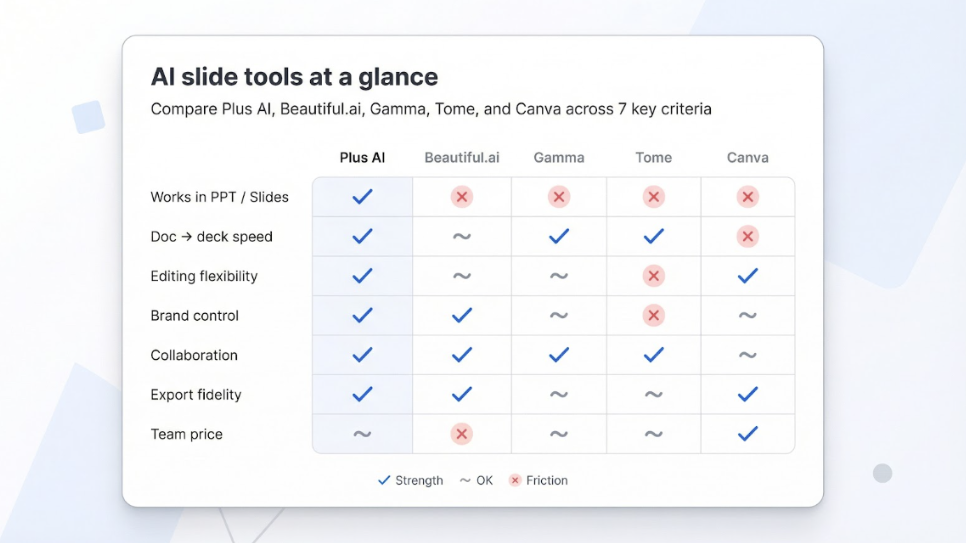
The matrix below condenses the seven checkpoints into a single view. Green checks mark clear strengths, tildes show an acceptable middle ground, and red crosses flag friction your team will notice.
| Tool | Works in PPT / Slides | Doc → Deck speed |
|---|---|---|
| Editing flexibility | Brand control | Collaboration |
| — | — | — |
| — | — | — |
| Plus AI | ✓ Native add-ins for Google Slides & PowerPoint | ✓ |
| ✓ | ~ | ✓ |
| Beautiful.ai | ✗ Stand-alone app | ✓ |
| ~ | ✓ / ~ | ~ |
| Gamma | ✗ Web workspace | ✓ |
| ~ | ✗ | ~ |
| Tome | ✗ Web canvas | ✓ |
| ✗ | ✗ | ~ |
| Canva | ✗ Design platform | ~ |
| ✓ | ✓ | ✓ |
*Published annual rates checked February 2026. Verify each vendor’s pricing page before budgeting.
Match the row to your primary headache. Need native integration? Plus AI is the only option that never leaves Slides or PowerPoint. Prioritizing strict brand control? Canva offers locked templates and a Brand Kit. Beautiful.ai delivers fast automated layouts but trades that convenience for a higher per-seat cost and a constant export cycle.
The grid is a starting point, not a verdict. The next sections break down each tool so you can weigh the real-world trade-offs behind every icon and number.
Plus AI: work faster without leaving PowerPoint or Slides
The Plus AI add-in installs directly inside Google Slides and PowerPoint, so every generate, Remix, or Rewrite action happens in the file you already use. Open a Google Slides file, launch the Plus AI sidebar, paste a three-page brief, and within seconds a draft deck appears; no exports, no new interface, just your familiar editor running on autopilot.
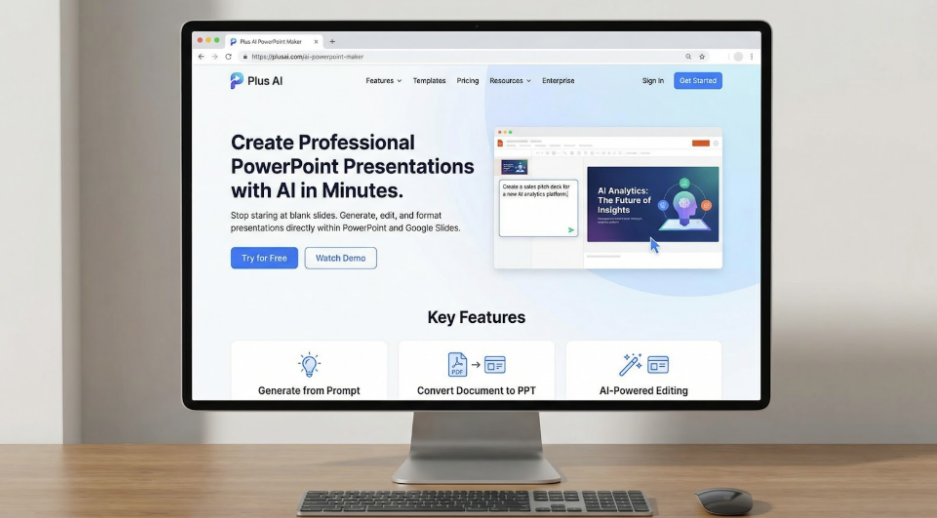
That inside-Slides experience is Plus AI’s signature benefit. The add-in installs directly in Google Slides and PowerPoint, so every generate, Remix, or Rewrite action happens in the file you are already editing. Because the output is born as a native .pptx or Slides file, nothing breaks when you share it with colleagues (see the Plus AI support guide).
Plus AI accepts prompts up to 100,000 characters (about 20,000 words)—ten times the length many rivals allow. That capacity turns dense quarterly reports into first-draft slides you can refine instead of retyping. Remix swaps layouts while keeping your copy, and Rewrite tightens wordy bullets in one click.
Because the deck lives in Google Workspace or Microsoft 365, you keep real-time comments and version history; reviewers do not need a Plus AI seat to leave feedback.
Trade-off: Branding follows the template you start with. Plus AI will not lock fonts or colors unless you load a pre-approved theme, so heavy visual makeovers still rely on the host editor.
Pricing (checked February 2026): Basic $10 USD per user per month, Pro $20 USD per user per month, both with a 7-day free trial. That is less than a single Beautiful.ai Team seat and without the export hassle.
If constant app-hopping slows your team, Plus AI keeps every step—from first draft to final share—inside the tools you already trust.
Beautiful.ai: quick polish inside a closed box
Beautiful.ai won early fans with Smart Slides, layouts that auto-adjust text, spacing, and alignment as you type. For a solo creator, that hands-free polish feels impressive.
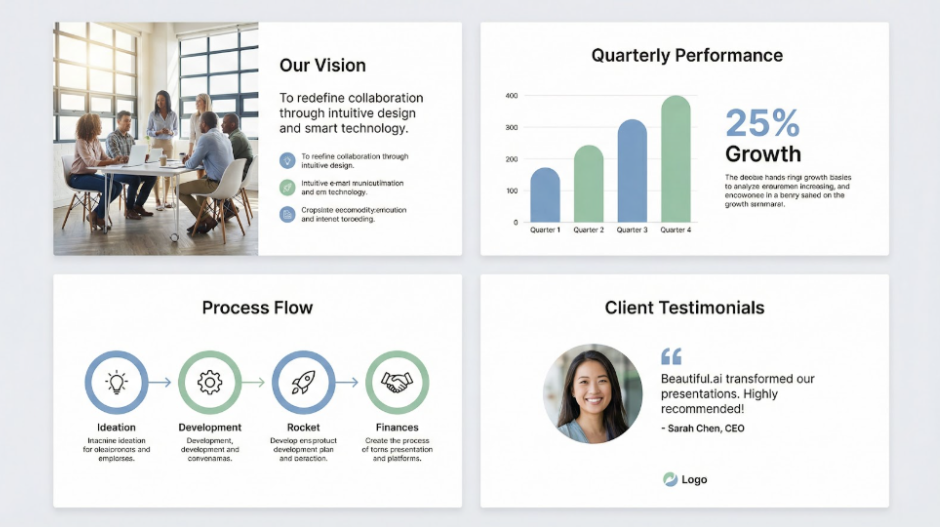
Collaboration shows the limits. Because the software runs in its own web app, every teammate must switch platforms. After you export to PowerPoint, later edits never sync back, and exported files lose animations and audio tracks, according to a Beautiful.ai blog post. Version sprawl returns the moment someone tweaks “final_v3.pptx” offline.
Creative control can feel just as rigid. Smart templates guarantee consistency yet block off-grid photo crops, custom animations, or precise font changes—trade-offs that frustrate designers who need pixel-level freedom.
Cost is another pivot point. As of February 2026, the Team plan costs about $40 USD per user each month (billed annually), triple the Pro price for individuals. The 14-day free trial lets small groups test the waters, but long-term collaboration, strict brand governance, and deep PowerPoint integration remain paywalled or unavailable.
If your workflow prioritizes one-click polish over granular editing and you can work inside a separate app, Beautiful.ai fits. The moment your team needs real-time co-editing, airtight brand enforcement, or native PowerPoint files, the “beautiful” experience starts to feel boxed in.
Gamma: draft full decks at the speed of thought
When a research memo or a folder of screenshots needs to become a slide deck today, Gamma delivers. Paste a document or start with a short prompt, set the tone, length, and image style, and within seconds Gamma returns a presentation, a written brief, or even a hybrid web page.

Its card-based editor lets you shuffle, hide, or duplicate blocks until the narrative fits. Toggles, live embeds, and data widgets stay interactive when viewed in a browser, useful for product walk-throughs and internal reviews.
Limits show up after generation. Gamma offers themes but no locked brand kit, so strict fonts and colors still require a PowerPoint pass. Gamma’s help center notes that gradients and some fonts change on export, and large images can shift layouts. Independent testing found a 15-slide deck needed 15 to 45 minutes of PPT cleanup.
Collaboration keeps improving; teammates can comment inside the web workspace, but it is not yet as seamless as Google Slides multi-cursor editing.
Pricing (checked February 2026): Free tier with limited AI credits, Plus plan $8 USD per seat per month, and Pro $18 USD per seat per month for unlimited generations and branding removal.
Gamma suits startups and content-heavy teams that favor momentum over pixel perfection. Budget a few minutes for export polish before client delivery.
Tome: story-first pages that ditch the traditional slide
When a linear deck feels flat, Tome lets you tell a product story more like a scrolling web comic than a stack of rectangles. Describe the narrative you need, and Tome’s AI returns a sequence of full-bleed pages with headline copy, generous whitespace, and AI-generated images that reveal themselves with each click or scroll.

Visual impact is high. Backgrounds fill the screen, interactive embeds such as live Figma prototypes sit naturally on the canvas, and viewers progress scene by scene rather than slide by slide.
Trade-offs surface at hand-off. Tome exports only to PDF; multimedia elements and embeds disappear during conversion, and there is no .pptx option at all. Fine-grained layout tweaks are limited, so detail-oriented teammates may chafe when they cannot move an element a few pixels.
Collaboration exists, and co-authors can comment and edit, but it feels lighter than Google Slides multi-cursor editing; each contributor needs a Tome account.
Pricing (checked February 2026): Free plan for exploration. Tome Pro costs $20 USD per user per month on monthly billing or $16 USD per user per month on an annual plan and also includes PDF export and custom branding.
Choose Tome when you need a visually rich narrative and the audience is comfortable viewing it in-browser or as a PDF; keep a conventional PowerPoint ready for stakeholders who insist on editable slides.
Canva: design freedom and brand guards in one browser tab
Canva’s drag-and-drop editor made it a staple for social posts; its presentation mode extends the same creative freedom to full decks. Open any template and swap fonts, animate elements, drop in stock video, or pull live-data charts; nothing feels locked. For designers that latitude sparks ideas; for non-designers, the preset layouts prevent most missteps.
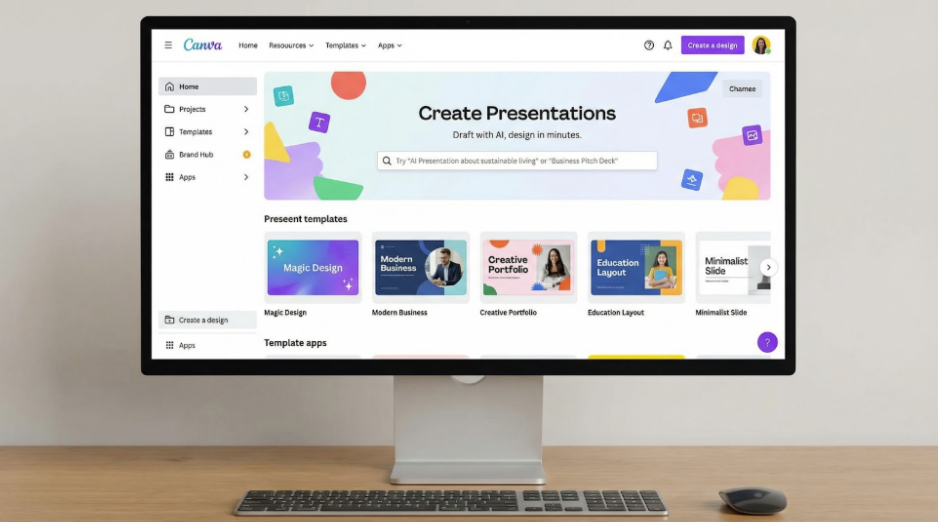
Brand control stays close. Upload your logo, colors, and fonts into a Brand Kit, then lock key elements so colleagues cannot drift off-brand.
Collaboration mirrors Google Docs: multiple cursors, real-time comments, even an integrated chat. Because every revision happens in the same cloud file, review cycles shrink and attachment chaos disappears.
Export fidelity is strong. If your team’s day-to-day work is updating existing decks (not starting from scratch), it’s also worth using AI to rewrite and refresh PowerPoint slides without breaking formatting—see this guide on how teams rewrite PowerPoint slides with AI. Canva’s own PPTX converter notes that text reflows are usually limited to minor line-height shifts, and all objects remain editable in PowerPoint.
Pricing (checked February 2026): Free tier for individuals and small teams. The Pro plan, about $15 USD per month, covers up to five users, and Canva for Teams scales with SSO and admin controls (volume pricing on request).
Choose Canva when design polish and strict branding matter more than raw AI speed. Pair it with content-centric generators such as Plus AI or Gamma, and you get fast drafts paired with on-brand visuals.
Pick your winner in 60 seconds
- Plus AI: Best when the team already works in Google Slides or PowerPoint and wants instant AI drafting without leaving those apps.
- Beautiful.ai: A fit for tiny teams that value one-click design over deep customization and can afford the higher Team pricing.
- Gamma: Choose raw doc-to-deck speed and flexible AI writing; plan for minor edits after exporting.
- Tome: Ideal for cinematic, scroll-based storytelling when the audience is comfortable viewing in-browser or as a PDF.
- Canva: Opt for agency-level visual control and locked brand styles, especially if a mix of designers and non-designers will collaborate.
Run a live project through your front-runner, note the friction points, and within a single workday you will have concrete evidence of whether the match is right.
Conclusion
Two hours of hands-on testing will tell you more than any checklist. Spin up a real presentation in your top choice, invite a teammate to co-edit, and export a PowerPoint. The experience—or the friction—will point you to the AI slide tool that genuinely saves time for your entire team.
FAQ: straight answers before you hit “subscribe”
- Is there a free-forever option?
Yes. Canva and Gamma keep permanent free tiers, and Tome lets you create unlimited pages until you need higher AI credits. Beautiful.ai offers a 14-day trial, while Plus AI provides a 7-day trial and then moves to subscription plans starting at $10 USD per user per month (checked February 2026). - Do teams really use AI for visuals, or is this still hype?
Adoption is widespread. Canva’s 2024 Visual Economy Report found that 82 percent of business leaders already use AI tools for visual content. - Which tool exports the cleanest PowerPoint file?
Plus AI leads because its output is born as native .pptx or Google Slides (no conversion step). Beautiful.ai, Gamma, and Canva export editable PowerPoints but often need minor font or spacing tweaks, while Tome exports only to PDF, so animations and embeds disappear. - Why does the Beautiful.ai Team plan cost more?
Brand themes, slide locking, and collaboration features sit behind the Team tier (about $40 USD per user per month) as of February 2026, roughly triple the Solo rate. - What if security is my top concern?
Look for tools that integrate with your existing identity stack and publish third-party audits. Plus AI inherits Google Workspace or Microsoft 365 permissions, Canva maintains SOC 2 Type II certification on paid tiers, and Beautiful.ai lists SOC 2 compliance for Business customers. Always review each vendor’s data policy with IT before uploading sensitive material.
Published: February 25, 2026