
Experts often make a costly mistake, trying to prove their knowledge instead of sharing it. The outcome is content packed with jargon, caveats, and technical detail that leaves readers more confused than informed.
That’s because your audience doesn’t come to you for a lecture. They want clarity, and they want to trust that you know what you’re talking about without needing a dictionary to follow along.
Communicating expertise well means striking a balance. You need enough depth to establish credibility, but not so much that you lose the person you’re trying to help. This simply means translating complex ideas into language anyone can act on.
Here, we’ll break down some practical ways to share what you know while keeping your audience engaged, informed, and confident in your guidance. You’ll learn how to simplify without losing substance, when to use examples over explanations, and how to structure content that respects your reader’s time.
Organize Expertise Around the Decisions Your Audience Needs to Make
Experts often default to explaining everything they know, but readers don’t need that. They need help making a decision. When you organize your content around the choice your audience faces, you give them a clear path through the material instead of a wall of information.
This approach works because it filters information by relevance. Readers can see only what applies to their specific choice, and they can compare factors side by side instead of hunting through paragraphs for what matters.
To use this for your brand:
-
Outline your customer’s decision journey first.
-
List the choices they make before, during, and after working with you.
-
Determine if readers are trying to choose between options, decide if they’re ready for something, or figure out their next step.
-
Once you know the decision, map out the questions people ask before making it.
-
Then group your expertise around those questions instead of your own mental outline of the topic.
-
Build content around each choice, such as what to compare, what to ask, and what to avoid.
-
Skip generic overviews and lead with the decision itself.
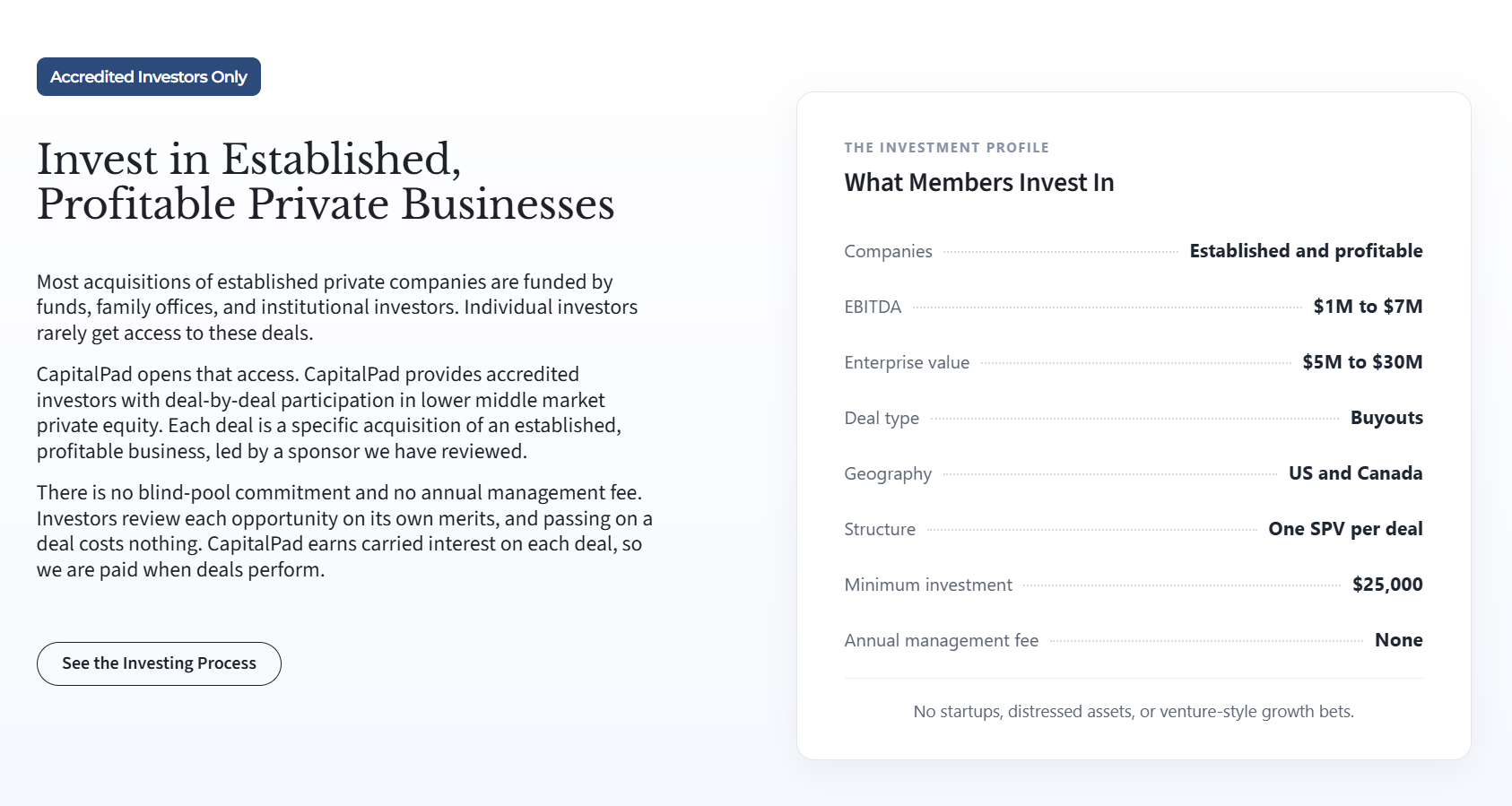
An excellent example of a brand doing this correctly is CapitalPad, a private equity platform that operates in a space built on dense financial and legal detail.
Rather than teaching investors everything about private equity upfront, the company packages each deal with a complete diligence set covering the company, the sponsor, deal structure, terms, and key risks.
This allows investors to evaluate one specific decision with exactly the information that decision requires.
Group Complex Information Into Familiar Categories
A complex offer overwhelms people when they see it as a raw list of features. Give them a familiar category first, and the features start to make sense on their own.
That’s because grouping information into recognizable structures hands your audience a mental shortcut before they process technical detail.
Familiar structures reduce cognitive load because they tap into existing knowledge instead of asking readers to build a new framework from scratch. A reader who understands “data encryption” doesn’t need you to explain what an encryption key does. You can skip straight to what makes your version useful for their situation.
To use this method:
-
List every feature of your product or service.
-
Organize these features into three or four categories that match how your customers currently describe their problems.
-
Create categories your audience already understands, like communication channels, common tasks, or everyday use cases.
-
Use these categories as the primary headings for your content.
-
Place the specific features in the sections following those headings as supporting information.
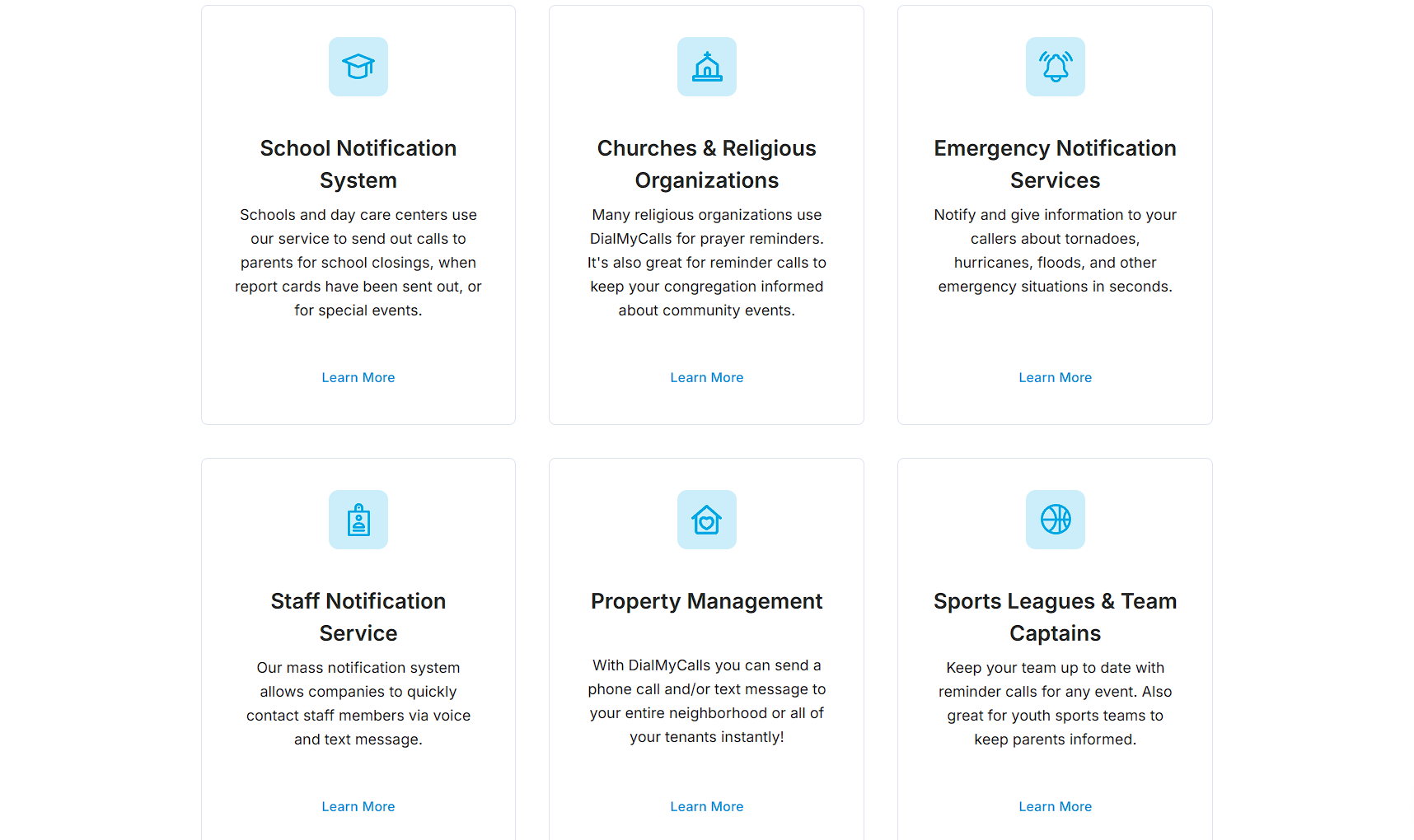
DialMyCalls, a mass text and voice messaging service, structures its site around real-world use cases instead of a feature dump.
Rather than opening with a list of texting tools, the company groups content by audience type, such as schools, healthcare providers, contractors, religious organizations, and emergency services, among others. Each group gets specific examples, like appointment reminders for healthcare or closure alerts for schools.
This allows visitors to recognize their own situation immediately, then explore the relevant features without wading through capabilities that don’t apply to them.
Use Guided Tools to Help People Navigate Complicated Choices
Complicated decisions overwhelm people faster than simple ones. When choices carry personal stakes, like health, money, or safety, readers don’t want a catalog of every option. They want help narrowing down to what fits their situation.
This is where guided tools earn their place. A quiz, filter, or comparison tool can process a maze of variables on the reader’s behalf, then hand them a short list that actually applies to them.
These tools work best when they preserve useful detail instead of stripping it away. A good guided tool asks the right questions, then surfaces relevant information based on the answers. A bad one just hides complexity without helping anyone make a real choice. The purpose is narrowing, not oversimplifying.
Guided tools also build trust because they show your brand listens before it recommends. Research shows that 91% of consumers would stay more loyal to a brand that acts on their feedback, and a well-built tool acts like a live feedback loop. Every answer shapes what the person sees next.
To use this for your brand:
-
Select the two or three factors that most influence your customers’ decisions.
-
Build a short quiz, filter, or comparison feature around those factors.
-
Make sure each question narrows the options meaningfully instead of just adding steps.
Bay Alarm Medical, a medical alert systems provider, applies this well. Choosing a medical alert device involves personal factors like mobility, home layout, and safety concerns, which makes comparison shopping stressful for many buyers.
Bay Alarm Medical solves this with a six-question product quiz covering lifestyle details like mobility level and home setup. Based on the answers, the tool generates a personalized product recommendation, turning a confusing product lineup into a single, relevant suggestion.

Translate Technical Knowledge Into Simple User Workflows
Nobody wants a lecture on Bluetooth protocols when they’re deciding whether a product fits their life. They want to know what they’ll actually do with it.
Translating technical capability into a simple workflow gives your audience that answer immediately. Show three or four steps a person takes from start to finish, and the underlying engineering becomes easy to trust without needing an explanation.
This is effective because it grounds abstract specs in something concrete. A spec sheet tells someone what a product contains. On the other hand, a workflow tells them what changes in their day.
Once someone understands the basic experience, they’ll want the technical detail, and that’s the right moment to provide it. Leading with specs before purpose asks readers to do translation work themselves, and most won’t bother.
Everyday scenarios strengthen this further. When you describe a real moment, like misplacing a bag or searching for keys, technical capabilities suddenly connect to a felt need instead of sitting as abstract features.
To implement this:
-
Write out the exact sequence of actions your customer takes when using your product, from setup to daily use.
-
Keep it to three or four steps, described in plain language.
-
Add technical specs and differentiators after the workflow, not before it.
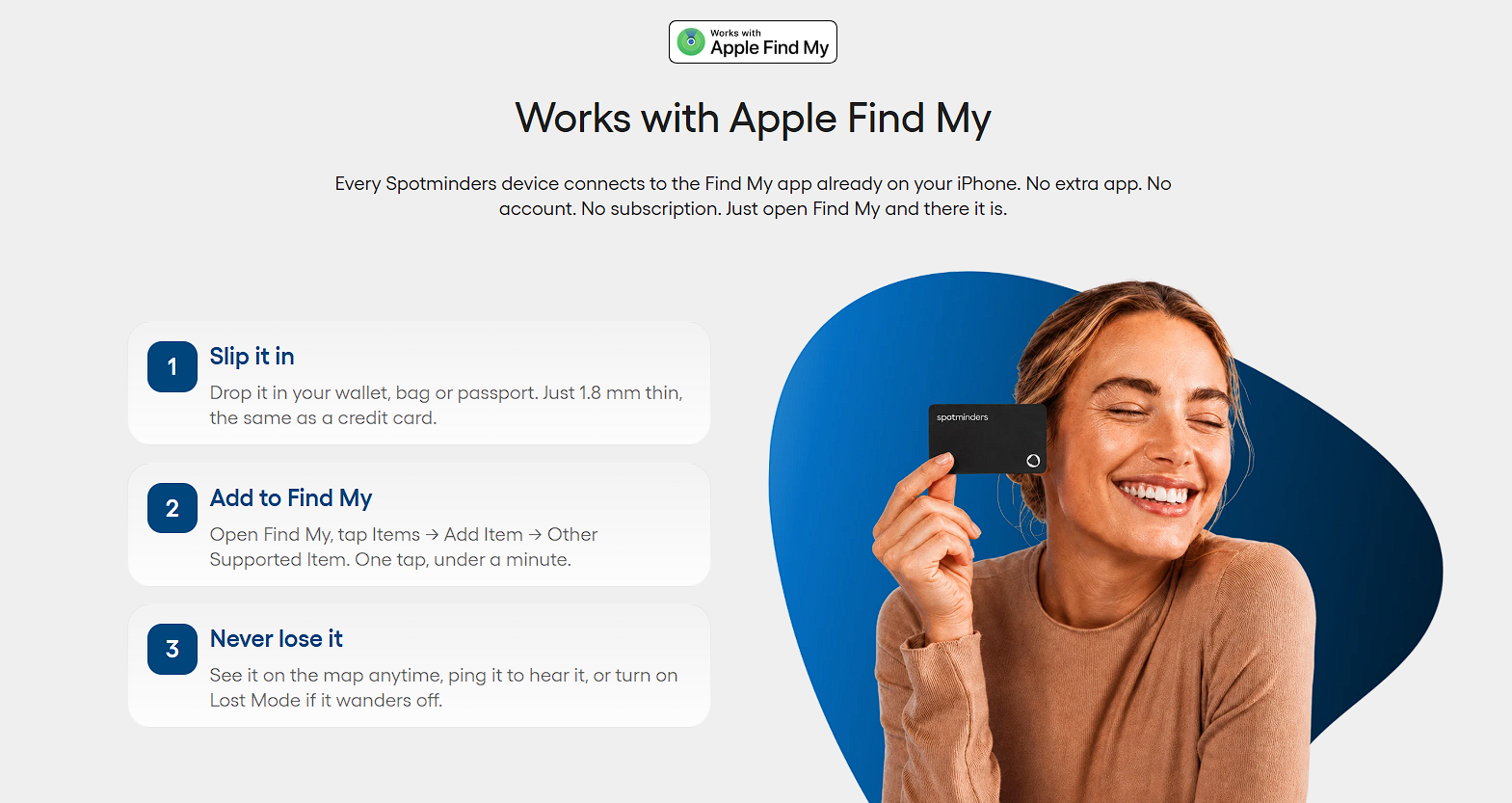
Spotminders makes slim wallet tracking cards that slide into wallets, bags, and passports to help people find misplaced items.
The company’s site skips a deep dive into wireless signal technology and opens with a short workflow instead – tap the card to your phone, slide it into your wallet or bag, then check its location through the Find My app.
Only after that sequence does the site explain battery life, waterproofing, and network range, giving technical shoppers what they need without burying casual visitors.
Use Concrete Examples to Make Abstract Expertise Easier to Understand
Abstract explanations ask readers to build their own mental picture of how something works. A concrete example builds it for them. When you show a real scenario, a demonstration, or a case study, you give your audience a specific context to anchor an idea, which cuts down the terminology needed to explain it.
People understand a principle faster when they see it applied than when they read about it in the abstract.
The strongest examples clarify rather than decorate. An example that exists purely to promote your brand reads as marketing, and readers tune it out. On the other hand, an example that walks through a real problem and its resolution teaches something. That’s what earns attention and trust.
Case studies carry particular weight here. Companies that consistently publish detailed, high-quality case studies generate 45% more qualified leads than companies that skip this practice. The reason lines up with the mental model above – prospects trust proof they can verify over claims they can’t.
To apply this:
-
Choose one clear example for each concept you explain.
-
Describe the situation, the approach, and the outcome in plain terms.
-
Skip vague wins and include specific details readers can picture.
-
Pick cases that isolate the exact concepts you’re teaching, not ones that pile on unrelated wins to impress readers.
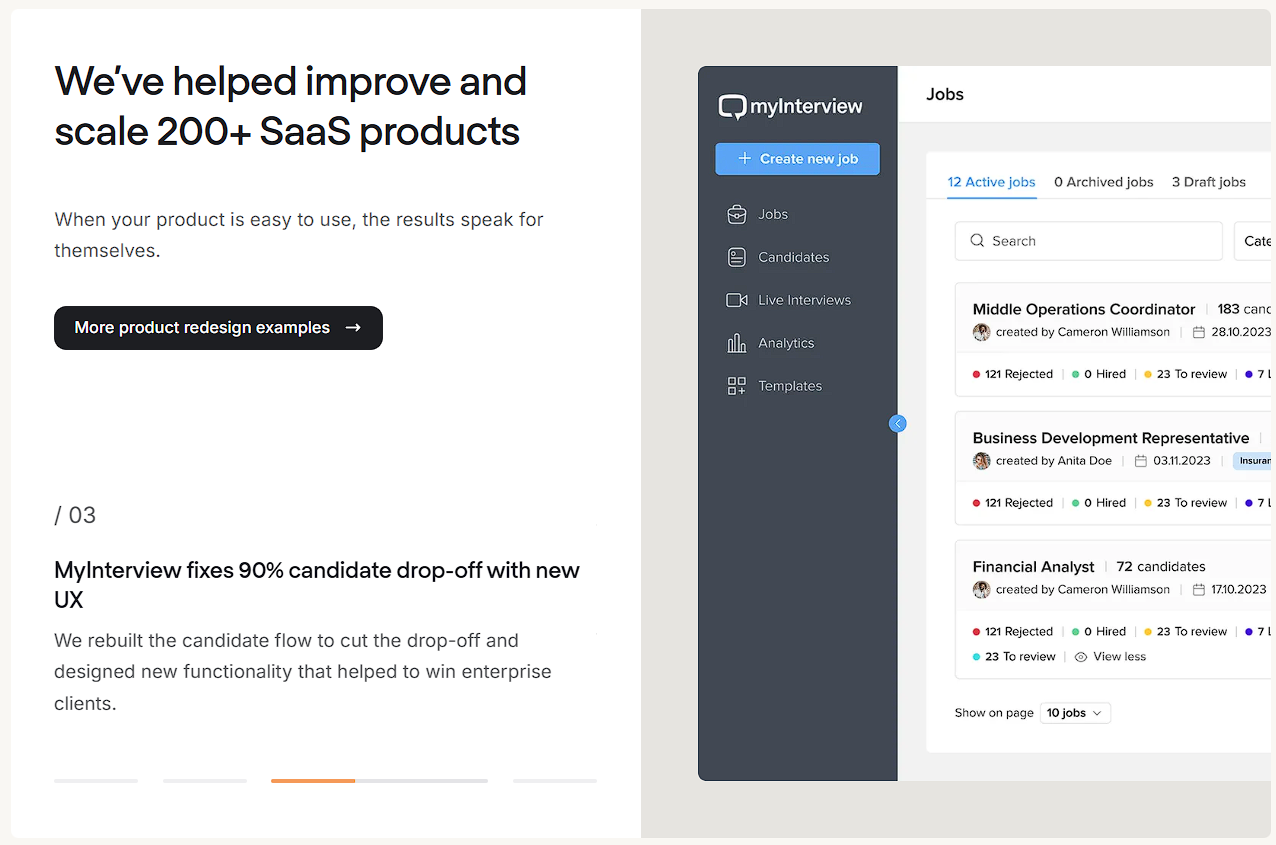
Eleken, a UI/UX design agency focused on SaaS products, builds much of its site around this exact structure.
Instead of describing its design process abstractly, the agency shares short case study excerpts that show a client’s problem and the fix Eleken delivered.
Each excerpt links to a full case study page detailing the entire story, from the original challenge through the design decisions to the measurable result.
Final Thoughts
Expertise becomes easier to understand when you organize it around your audience’s needs.
Use clear categories, guided tools, practical workflows, and concrete examples to give readers a straightforward path through complex information. Also, keep the technical depth available, but introduce it at the point where it helps people understand, evaluate, or act.
What you’ll end up with is content that demonstrates authority while remaining useful and accessible.
Published: September 10, 2026