A professor with 40 students can’t hold 40 office hours. She holds three sessions instead, caps each one, and then spends Sunday night sorting email replies into a spreadsheet.
That’s the problem group scheduling solves: one time slot, many people, a limit. Not exotic. But on most scheduling tools it sits behind a paid plan, which is an odd place to put it — the people who need it most are teachers, student groups, and volunteer coordinators with no software budget.
We made group events free on every 42min account. Here’s how they work, and where they don’t.
One slot, many bookings
On a normal booking page, a time vanishes the moment someone takes it. A group event keeps the slot open until it hits the cap you set.
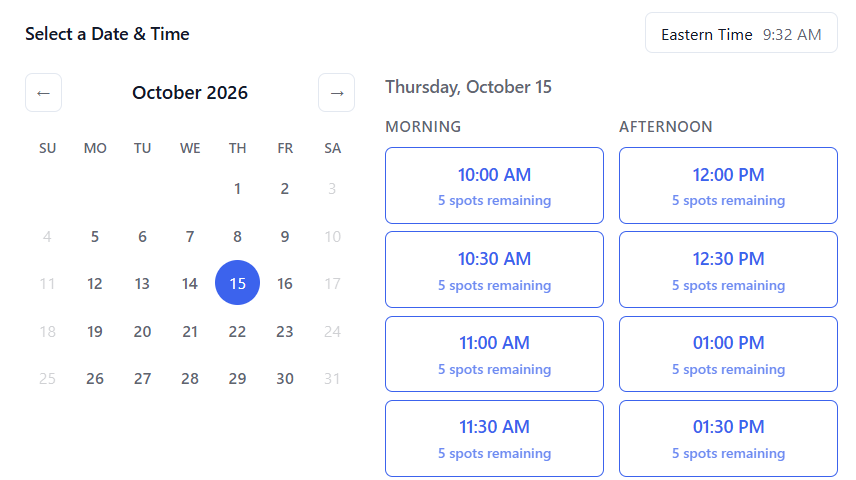
Say you publish three lab briefings: Monday at 3:00 p.m. with 15 seats, Wednesday at 11:00 a.m. with 15, Thursday at 5:00 p.m. with 8 because the small room is the only one free. Students open one link, pick a session, register individually, and get their own confirmation. Each slot closes itself when it fills. You can show remaining seats if you want the scarcity to do some work.
This isn’t the same as adding guests to one person’s booking. Everyone books for themselves; everyone attends the same session.
The paywall pattern
Most scheduling products have a free plan. Almost all of them build it around the one-to-one appointment, and the group version is the upsell.
As of September 2026, Calendly puts Group event types on Standard and above, not Free. TidyCal puts Group Bookings on its paid tiers. Cal.com is a partial exception — seats work on individual event types, while shared team availability, round robin, and collective events belong to the Teams plan.
For a sales team buying software, that’s a line item. For a department where every instructor needs their own organizer account, it’s a reason to keep using the spreadsheet.
What’s included
Create as many group event types as you want. Set capacity per slot. Run the session on Google Meet, Microsoft Teams, Zoom, a custom link, or in a physical room — a building and room number instead of a video link. Add booking questions, connect your calendar so it won’t double-book you, and let confirmations and reminders handle the follow-up.
Group + Round Robin is included too. When several advisors can lead the same session, the first person to book a slot pulls in an available host, and everyone booking that slot afterward joins the same host. Different sessions land with different people, and nobody assigns anything by hand.
Participants don’t need a 42min account. Times display in their own zone.
What it doesn’t do
There’s no waitlist yet. When a slot fills, it fills; if someone cancels, the seat reopens quietly and whoever refreshes first takes it. If no-shows are a problem for your sessions, overbook slightly rather than waiting on a queue feature.
Group events vs. meeting polls
Two different jobs get called “group scheduling.”
If people should choose independently among sessions you’ve already scheduled, you want a group event. If one group needs to agree on a single time, you want a meeting poll — propose times, everyone marks availability, best option wins. Polls are free as well, and voters don’t need an account.
Setting one up
Create a Group event type, or Group + Round Robin if hosting should rotate. Set the seat count. Pick the schedule, duration, and location. Share the link by email, course page, student portal, or a QR code on a poster.
Then stop managing it. Slots fill and close on their own.
A volunteer orientation shouldn’t need a purchase order. Group scheduling is scheduling, so it’s part of the free plan — every organizer on your team, no per-seat bill from us. If you outgrow it, tell us what broke. That’s usually how the next feature gets built.
Published: September 3, 2026